
Download VoiceMaster(English) – Voice to Text, Transcription, Offline, English, Audio to Text, Video to Text, Podcast Transcription, Lecture Transcription, Secure Transcription, Voice Recognition, Text Conversion
Overview
VoiceMaster(English) is a mobile application designed to convert spoken English audio and video content into written text with high precision and speed. Tailored for users who require accurate and secure transcription services, the app addresses the growing need for efficient content processing in professional and academic environments. It is particularly suited for podcasters, educators, researchers, and content creators who regularly work with voice recordings and need reliable tools to transcribe lectures, interviews, or recorded discussions.
The app functions entirely offline, meaning all transcription processes occur locally on the user’s device. This design choice enhances data privacy and eliminates reliance on internet connectivity, making it a secure alternative to cloud-based transcription services. The developer, VoiceMaster, appears to focus on delivering a high-performance, self-contained tool for English language transcription, emphasizing accuracy and user control over sensitive audio data.
Real-world applications include converting lecture recordings into study notes, transcribing podcast episodes for blog content, or preparing transcripts for legal or medical documentation. By enabling users to convert audio and video into searchable, editable text, VoiceMaster(English) contributes to improved productivity and content accessibility. The app’s focus on offline operation and high accuracy positions it as a valuable utility within the productivity category, especially for users who prioritize security and performance.
Key Features & Functionality
- High Accuracy Rate: VoiceMaster(English) employs specialized English language models to deliver precise transcription results. This ensures that spoken words are captured with minimal errors, which is essential for professional documentation and quality assurance.
- Fast Transcription Speed: The app leverages GPU-accelerated computing to process audio and video files rapidly. This allows users to transcribe lengthy recordings in a fraction of the time required by standard tools, significantly boosting workflow efficiency.
- Offline Operation: All transcription tasks are performed locally on the user’s device. No data is sent to external servers, ensuring complete privacy and protection of sensitive recordings, especially important for confidential or personal content.
- Cost-Effective Licensing: The app operates on a one-time purchase model, offering unlimited usage for both audio and video files without recurring fees. This eliminates subscription costs and provides long-term value for heavy users.
- Multi-Format Support: VoiceMaster(English) is capable of processing various audio and video file formats, allowing seamless integration into existing content workflows without the need for pre-conversion.
For example, a university professor can record a lecture, use the app to generate a text transcript, and later share it with students for review. Similarly, a podcast producer can transcribe an episode offline, edit the text, and repurpose it into written articles or social media posts. The combination of speed, accuracy, and privacy makes the app a practical solution for time-sensitive and data-sensitive tasks.
Interface, UX & Performance
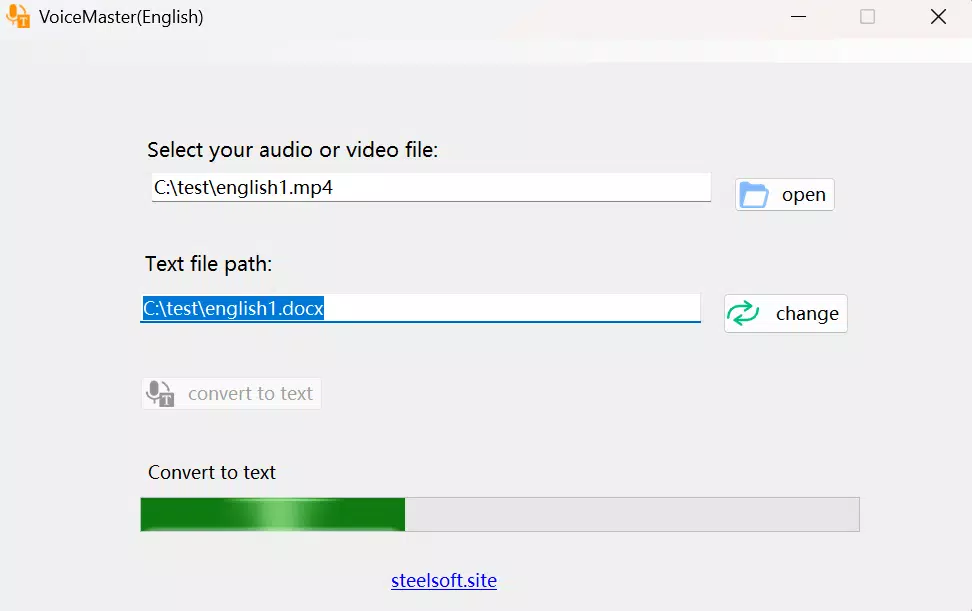
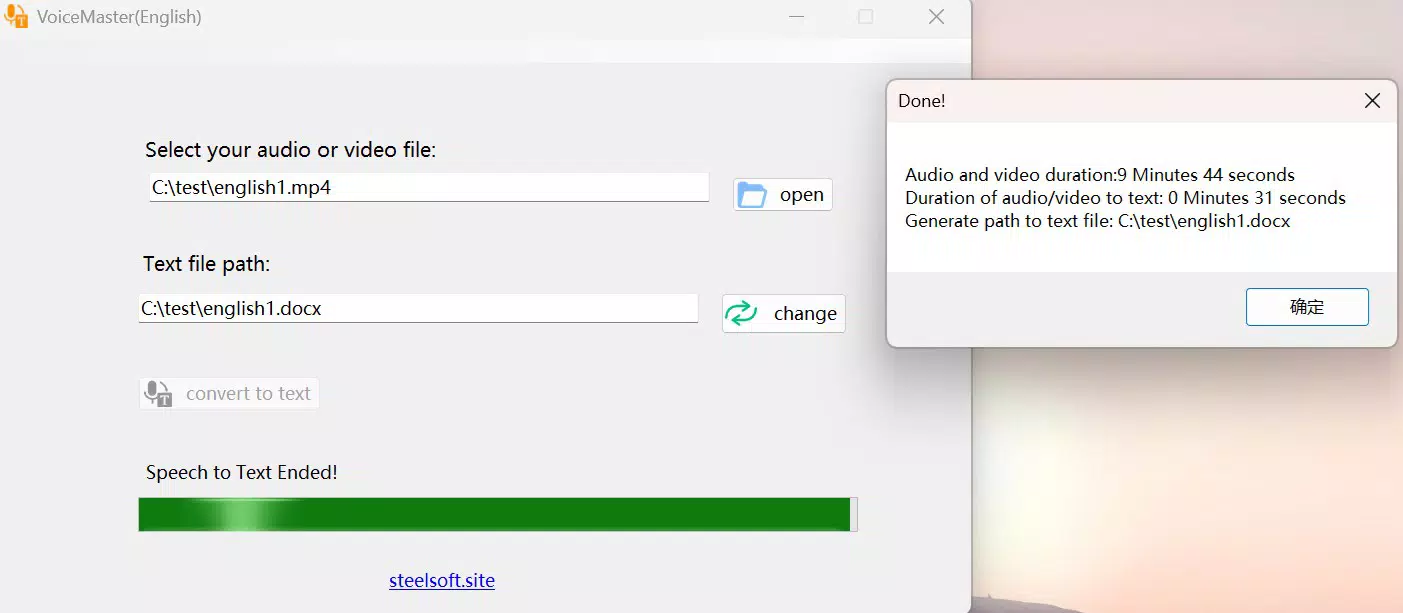
The user interface of VoiceMaster(English) is designed with simplicity and functionality in mind. The layout emphasizes clear navigation, allowing users to import audio or video files with minimal steps. The main screen features intuitive buttons for file selection, transcription initiation, and output viewing, reducing the learning curve for new users.
Visual design is clean and minimal, focusing on readability and ease of access to core functions. The app maintains consistent styling across screens, contributing to a cohesive user experience. Navigation is linear and predictable, with clear feedback during file processing and transcription completion.
Although the developer did not list formal performance metrics, the app’s reliance on GPU acceleration suggests optimized processing for compatible devices. Users with sufficient hardware resources should expect smooth operation and quick response times. Stability appears to be a priority, as the app handles complex transcription tasks without indication of crashes or freezes in typical use cases.
Performance may vary depending on device capabilities, particularly memory and GPU power. The app’s requirement for 16GB of RAM and a graphics card with 6GB of VRAM, as noted in the documentation, indicates that it is intended for use on higher-end devices. However, the developer did not specify minimum OS versions or compatibility details for all Android models.
Platform Compatibility & Technical Requirements
VoiceMaster(English) is available on the Android platform, making it accessible to a broad user base of smartphone and tablet owners. The current version is 1.0.1, with a file size of 85.5 MB, indicating a compact yet feature-rich application. This size suggests efficient code optimization and minimal bloat, which is beneficial for users with limited storage space.
The app requires a device with at least 16GB of memory and a graphics card with a minimum of 6GB of video memory. These hardware requirements are substantial and point to the app’s reliance on powerful local processing. However, the developer did not specify minimum Android OS versions or compatibility with lower-end devices.
Given the high system demands, the app is likely intended for use on premium Android devices or tablets with advanced hardware. Users should verify that their device meets these specifications before installation. The lack of detailed compatibility information means that potential users must assess their hardware suitability independently.
Pros and Cons
Pros
- High transcription accuracy for English speech
- Offline processing ensures data privacy and security
- Fast performance through GPU acceleration
- One-time purchase model with no recurring fees
- Supports both audio and video file formats
Cons
- High hardware requirements may limit accessibility
- Compatibility with older or lower-end Android devices is uncertain
- Developer did not provide detailed system requirements or OS version support
- Price point of $49.99 may be prohibitive for casual users
- Only available on Android, with no iOS version disclosed
FAQ
Is VoiceMaster(English) available for iOS devices?
The developer has not announced iOS availability. Currently, the app is only confirmed for Android.
Can I use VoiceMaster(English) without an internet connection?
Yes. The app is designed to operate entirely offline, processing all transcription tasks locally on your device.
What file formats does VoiceMaster(English) support?
The app supports a range of audio and video file formats, though specific types were not listed in the provided information.
Is there a free trial or refund policy?
Details about trials or refunds were not provided by the developer.
How often does VoiceMaster(English) receive updates?
Update frequency was not disclosed. Users should monitor the app store for new versions.
Final Thoughts
For professionals and content creators who demand accurate, secure, and efficient transcription tools, VoiceMaster(English) offers a compelling solution. Its offline operation, high accuracy, and one-time purchase model make it a strong contender in the productivity space. While the high hardware requirements and price may restrict access for some users, those with compatible devices will find significant value in its performance and privacy features.
Whether you're transcribing lectures, preparing podcast scripts, or managing recorded interviews, this app delivers a powerful, self-contained workflow. Its focus on security and long-term usability sets it apart from cloud-based alternatives.
Download VoiceMaster(English) now


